My Claude Code skills start every run with the answers pre-loaded
9 min read • 1681 words
Pro tip Copy the following into Claude Code (or Codex) to use this idea for yourself:
Read this blog post first so you have the pattern in context:

    https://www.lukezilioli.com/blog/post/claude-skill-context-injection

Then:

1. Install things-cli if it isn't already on this machine (brew install ossianhempel/tap/things3-cli).

2. Walk me through enabling the Things URL scheme and generating an auth token — it's under Things → Settings → General → "Enable Things URLs." Docs: https://culturedcode.com/things/help/articles/enabling-the-things-url-scheme/.

   DO NOT ask me to paste the token into this chat. First, ask me how I want to store secrets on this machine — options include an env file (e.g. `~/.config/things/env`), a line in my shell profile (`~/.bash_profile` / `~/.zshrc`), 1Password CLI (`op read ...`), macOS Keychain, or something else. Use my answer to pick a target location, then open (or create) that file with a clearly-marked placeholder (`THINGS_AUTH_TOKEN=<YOUR_TOKEN_HERE>` or equivalent for the chosen mechanism) and tell me exactly where to paste the token. Then have me reload my shell / source the file and confirm things-cli can read from Things 3 before moving on.

3. Fetch the full list of my Things 3 areas and projects so we have a concrete menu to pick from. Print them back to me as a numbered list.

4. Interview me about the skill I want to create. You're trying to figure out:
   - Which area or project should the skill pre-load context from?
   - What subset of that list matters (open only, tagged with X, in a specific section, etc.)?
   - Once the state is loaded, what should the skill actually help me do with it (triage, pick one to start, summarize, something else)?
   - Should the skill make any updates to the tasks on the list as it acts on them (check items off, add notes, re-tag), or is it strictly read-only?

5. Scaffold the skill as described in the post — two files under ~/.claude/skills/<skill-name>/:
   - context.sh (sources any dotfiles it needs, runs the things queries, prints clean plaintext)
   - SKILL.md (frontmatter with allowed-tools pointing at the script, body injects the script via !-inline, then tells the agent how to reason from the pre-loaded state)

Pause after each step and confirm with me before moving on.
Stop making your agent re-discover what your machine already knows
Here's the flow I'm trying to optimize: I use an iOS or macOS feature, think "somebody should know about this," and jot it into a Things 3 project called Apple Wishlist & Tips — sometimes a full draft in the note, sometimes just a title I'll have to decode later. When I sit down to write, a Claude Code skill reads that project, triages it with me, and helps me turn the next entry into a finished post at apple.lukezilioli.com/tips. So: thought → Things → skill → published tip.
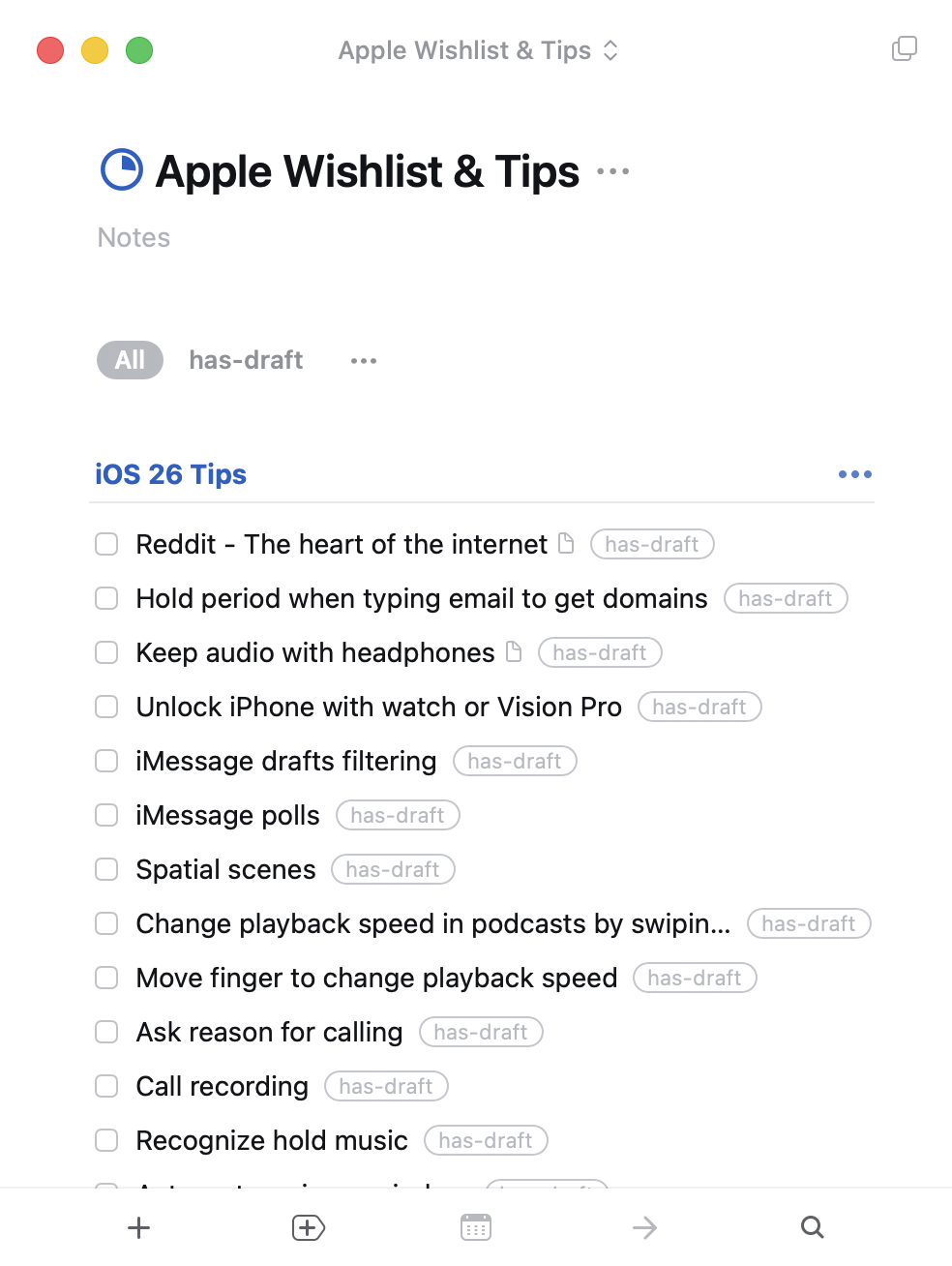
I wrote a Claude Code skill, tips-and-tricks-triage, to help me pick which one to write next. The interesting trick isn't the triage itself — it's that every time the skill runs, Claude opens with this already in its context, before the first turn:
- Reddit - The heart of the internet
    note: Address bar → r/ shortcut, reader mode default
- Hold period when typing email to get domains
    note: iOS 26 keyboard: long-press the . to get .com/.net/.edu picker
- Keep audio with headphones
    note: Accessibility → Audio → keep playing when I take one out
- Unlock iPhone with watch or Vision Pro
- iMessage drafts filtering
- iMessage polls
- Spatial scenes
- Change playback speed in podcasts by swiping
- Move finger to change playback speed
- Ask reason for calling
- Call recording
- Recognize hold music
No things tasks calls, no permission prompts, no tool-use turns spent fetching the list. It's just there — exactly what you'd see if you opened Things 3 yourself — and the skill body can jump straight to the judgment call: "given the above, which one should I polish tonight?"
The rest of this post is how that works, why it matters, and the generalizable pattern underneath it.
The obvious (slower) way
The naive way to build this skill is to structure the queries as numbered steps in the skill body: "Step 1: list the entries in the project. Step 2: for each, read the attached note. Step 3: reason about what to work on." The agent runs the steps, gets the answers, and proceeds.
That works. It's also inefficient. Every invocation, the agent burns tool-use turns — and the tokens that come with them — re-discovering information my machine could have handed it up front, for free, deterministically. And that lookup work isn't even the interesting part of the skill; the interesting part is the triage, once you know what you're working with.
SKILL.md has a feature that makes fixing this almost trivial.
The feature: !-inline execution in SKILL.md
Claude Code's skill docs document a piece of syntax that solves this cleanly:
The
!`<command>`syntax runs shell commands before the skill content is sent to Claude. The command output replaces the placeholder, so Claude receives actual data, not the command itself.
The command runs before Claude sees the skill body, and its stdout is substituted inline into the markdown. By the time the model starts reasoning, the command output is already in its context — as if I'd hand-typed the current state into the prompt.
The distinction matters: this isn't the agent deciding to run a command mid-run. It's pre-processing that happens on every skill invocation, unconditionally, before the model gets a turn.
Why you need a separate .sh file
The naive way to use this feature is inline:
## Current state

!`things tasks --project "Apple Wishlist & Tips" --status any --json`
That works for simple commands. It falls over the moment you need environment setup. In my case, the things CLI needs an auth token loaded from a dotfile:
source ~/.dotfiles/things/init.shClaude Code's permission checker rejects inline commands that contain source or . (dot-source) — it flags them as "evaluates arguments as shell code." Which is correct, and which means you can't source a dotfile from a !-inline command directly.
The workaround is a wrapper script:
- Create a
.shfile in the skill directory. chmod +xit.- Reference the script from the
!command — the top-level command is just a path, no shell-code evaluation. - Add an
allowed-toolsentry to the skill frontmatter so the script runs without a permission prompt.
---
name: tips-and-tricks-triage
description: Triage my Apple Wishlist & Tips project and help me pick what to write next
allowed-tools: Bash(/Users/elzee/.claude/skills/tips-and-tricks-triage/context.sh)
---

## Current state (injected at run-start)

!`/Users/elzee/.claude/skills/tips-and-tricks-triage/context.sh`

Use the block above as ground truth for what's in the project, which entries
already have drafts, and which are still stubs. Do NOT re-run `things tasks` —
the state is already here.
The script itself can do whatever it needs — source dotfiles, set env vars, call CLIs, post-process with jq. The permission check only applies to the top-level ! command, and a plain script path is fine.
What the script does
Here's a stripped-down context.sh:
#!/usr/bin/env bash
set -euo pipefail

source ~/.dotfiles/things/init.sh   # loads THINGS_AUTH_TOKEN (not strictly required, but a handy excuse to demonstrate why the wrapper script exists)

THINGS=/opt/homebrew/bin/things
PROJECT="Apple Wishlist & Tips"

"$THINGS" tasks --project "$PROJECT" --status incomplete --json \
  | jq -r '.[] | "- \(.title)\(if .notes and .notes != "" then "\n    note: \(.notes | split("\n")[0])" else "" end)"'
The output is the plaintext list you saw at the top of the post. The skill body can then say "given the above, help me pick one tip to polish tonight — lean toward entries whose notes make them closest to shippable," and the agent has everything it needs to reason immediately — no queries, no tool calls, no wasted turns.
Why this is different from "step 1: run the command"
You might reasonably ask: the agent is already capable of running things tasks. Why bother pre-computing?
Three reasons, in increasing order of how much I care about them:
1. It saves turns
Every CLI call the agent would have run is: one tool invocation, one permission prompt (or an allowed-tools entry to pre-approve it), one round-trip of tokens carrying the JSON into context, and one bit of reasoning to parse and remember it. Multiply by a couple of queries per triage run and you've spent a noticeable fraction of a budget before any actual thinking happens. The pre-injected version collapses all of that into zero extra turns.
2. It's deterministic
The injected block is always there, in every run, in a known format. The agent can't forget to run a query. It can't get partway through and decide to skip the inbox check because it feels confident it remembers. It can't misinterpret JSON output the first time and correctly the second time. The ground truth is just… there, at the top of the transcript, unambiguous.
This matters more than the turn-savings. The weakness of "the agent runs the command when it thinks it needs to" is that LLMs have opinions about when they need information. Pre-injection removes the opinion.
3. The skill body gets shorter
This is the one I didn't expect. Once the state is pre-injected, I can delete the "step 1: list today's tasks; step 2: check overdue; step 3: check inbox" boilerplate from the skill body, because those are no longer questions the agent needs to answer — they're preconditions. The skill shrinks to the parts that actually require judgment: given what's on my plate, what should I do first?
A skill that starts with "here's the complete state of the world; now go make the actual decision I need you to make" reads very differently from a skill that starts with "step 1, step 2, step 3, step 4…" The former is a briefing; the latter is a checklist. Briefings compose better with reasoning.
When to reach for this
Not every skill benefits. The cost of pre-injection is that the script runs on every invocation, whether the agent would have needed that information or not. For skills that are frequently a no-op, or where the ground truth is expensive to compute, always-on injection is wasteful.
The pattern shines when:
- The skill has a handful of near-universal preconditions (what's on my task list, what's in my inbox, what's in my calendar today, what branch I'm on, what files changed since the last commit).
- Computing them is fast and cheap compared to an LLM turn.
- The answers are deterministic — no judgment required, just a query or a
date +%Y. - The skill's real work is something the LLM does need to reason about, and removing the preconditions makes the reasoning cleaner.
For the triage skill: four queries, a second or two, a few dozen lines of pre-computed state, and the skill's remaining steps are now actually the interesting parts (which of these should I do first, what can I defer, what should I just delete). That's the sweet spot.
The generalizable pattern
Beyond the Things case, I think this is a broader lesson for authoring AI-driven tools:
Pre-compute what you can; save the model for what you can't. Your machine knows what's in your task manager, what today is, which branch you're on, which files have changed since the last commit. The model doesn't — until it asks. Every "until it asks" is a turn that doesn't have to exist.
The !-inline + allowed-tools + helper-script combo is the cleanest way I've found to bake that pre-computation into a Claude Code skill. Two files total:
~/.claude/skills/<skill-name>/
├── SKILL.md          # references context.sh via !`…`
├── context.sh        # runs the queries, prints the state
One-time setup, re-used on every invocation forever. The agent starts every run from ground truth. You stop writing "step 1: look things up" and start writing "given the above, do the thing."
Sources: